
NetSuite – Airtable Integration
Let your teams run intake, tracking, approvals, vendor requests, and operational updates in Airtable while NetSuite stays current on records, statuses, and transactions.
Start Integration
Why Teams Integrate Airtable with NetSuite
A NetSuite–Airtable integration becomes important when Airtable turns into the place where work moves, while NetSuite remains the system leadership and finance trust. Teams gain speed early. Alignment starts slipping later.
Airtable forms and interfaces make it easy to capture requests, changes, approvals, and operational notes. Teams submit clean information there. Someone later turns that record into a vendor, customer, project, item update, or transaction in NetSuite.
Airtable holds the latest comments, attachments, and task status. NetSuite holds the official record. A field gets updated in one place, then adjusted again in the other. Soon the team is asking which version matters.
An approval may look complete in Airtable while NetSuite still waits for the right entity, subsidiary, terms, or role-based signoff. Teams keep moving. Finance sees the impact later.
Attachments, internal notes, handoff details, intake answers, and back-and-forth communication stay inside Airtable records. NetSuite receives the outcome and misses the path that led there.
Airtable becomes the working surface for procurement, delivery, PMO, vendor operations, and internal request workflows. NetSuite remains the source of truth for finance and control. The integration has to respect both roles.
Airtable dashboards show flow and activity. NetSuite shows official records and financial impact. Leadership ends up comparing both to understand progress, blockers, and completion.
Run operational work in Airtable with NetSuite aligned at every step
Sphere connects Airtable to NetSuite so request records, approvals, and tracked updates in Airtable can create, update, and route the right NetSuite records. Our team defines field ownership, approval logic, entity routing, edit permissions, and exception handling so operational users get a clean workflow and finance gets reliable ERP data
Stop stitching systems manually — integrate NetSuite with clarity and ownership.
NetSuite and Airtable
Controlled record creation
Turn Airtable submissions into governed NetSuite actions: vendor requests, customer changes, item updates, project setup, custom records, and transaction-related workflows.
Request-to-approval routing
Approval paths can follow amount, department, subsidiary, request type, or business owner so each workflow lands with the right reviewer at the right step.
Status sync back to Airtable
NetSuite record IDs, approval decisions, hold states, completion status, and key milestones flow back into Airtable so the operational team keeps working from current information.
Attachments and context
Forms, linked records, comments, and supporting evidence can be tied into the integration flow so NetSuite users see what matters and Airtable users keep the full operational context.
OneWorld and access logic
Subsidiaries, currencies, departments, classes, locations, and role-based permissions shape how records are created and who can trigger each step.
How NetSuite and Airtable stay aligned
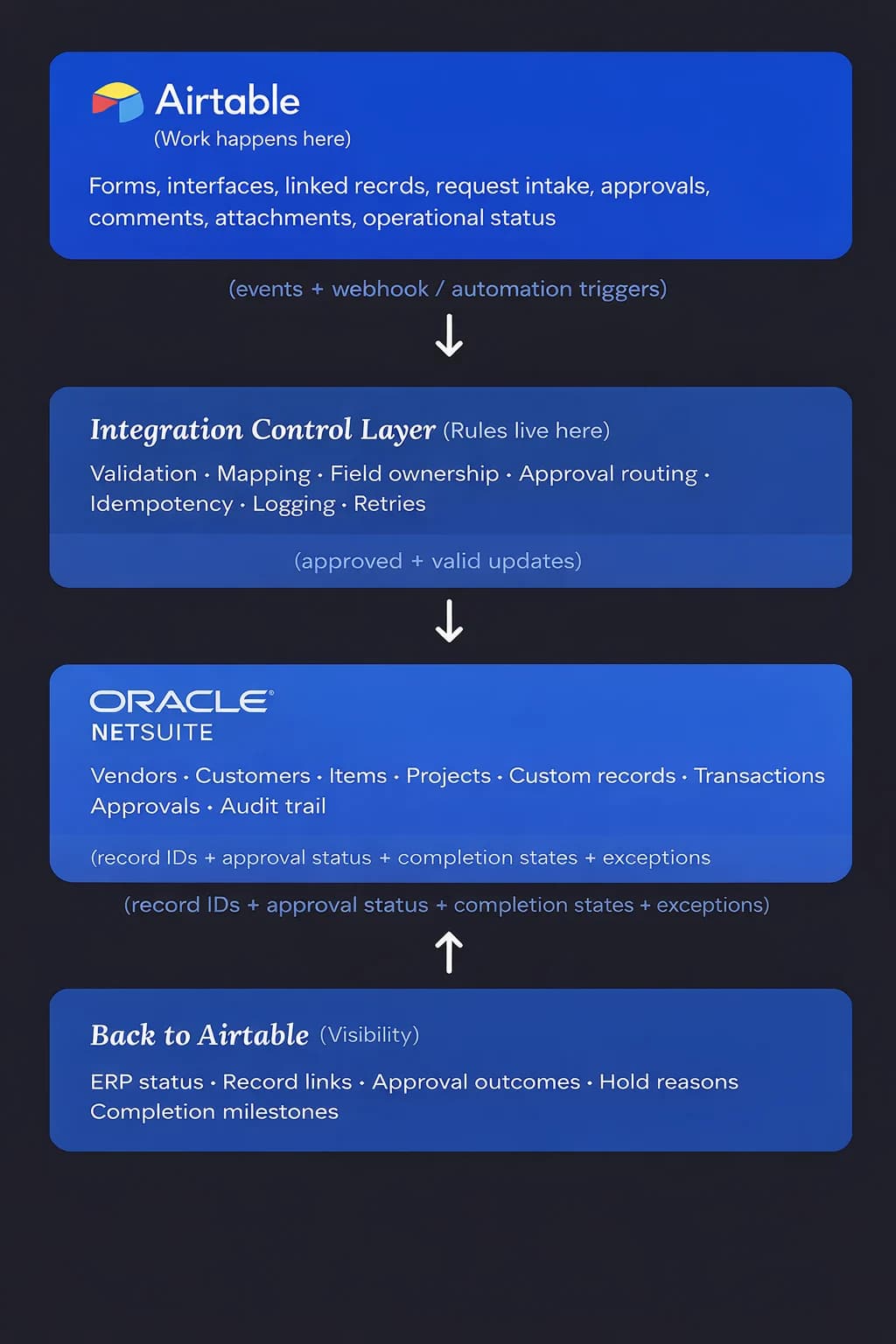
Airtable is where teams capture requests, approvals, and operational context. NetSuite is where the official records and financial impact live. Sphere connects the two through a controlled integration layer that validates incoming updates, applies field ownership rules, routes approvals, and prevents duplicates before anything reaches NetSuite.
When records are created or updated in NetSuite, key signals – record IDs, approval outcomes, completion states, and exceptions – flow back into Airtable. Teams keep working in Airtable with full visibility, while NetSuite remains the authoritative system for vendors, customers, transactions, and audit history.
How this integration is delivered

Phase 1 — Integration Assessment
2–3 weeks. Fixed price. Defines scope, flows, and complexity tier.

Phase 2 — Implementation
Fixed-price range based on complexity. Accelerator-based delivery.

Phase 3 — Managed Integration
Monthly support, optimization, and new workflows.
You buy the integration. The assessment defines how it will be built and priced.
Start IntegrationHear from Our Clients

TOP AI CODE Generation COMPANY UNITED STATES 2025

TOP AI TEXT Generation COMPANY florida 2025

TOP APP development COMPANY manufacturing 2025

TOP artificial intelligence COMPANY united states 2025

TOP chatbot COMPANY united states 2025

TOP recommendation systems COMPANY united states 2025
Sphere in Numbers
We understand that actions speak louder than words and numbers but here are some key facts about us.
Get the Right Talent now0
Years of Excellence
0+
Projects Delivered
0
Countries
Globally diverse, community-focused
0+
Clients
top 20 average 8+ years
Clear scope. Predictable cost. No open-ended builds.


Flexible, fast, and focused — Sphere solves your tech and business challenges as you scale.
Luke Suneja
Client Partner
Get Started with NetSuite – Airtable Integration
Please provide your contact details, and our team will get back to you promptly.